“Never be blindsided by an Azure change again.”
A quick recap (a.k.a. the embarrassing prequel)
Back in September 2024 I shared a humble little proof-of-concept: an Azure Container Instance that read the Azure Updates RSS feed, asked GPT-4o to make sense of it, and dropped the result into a Storage Account. It was honest work. It also looked exactly like what it was — a weekend project hiding behind a private endpoint.
That POC answered a question I kept hearing from platform teams at Dutch banks:
“How do we stop finding out about Azure deprecations from a panicked Slack message at 4pm on a Friday?”
The POC could technically answer that. But “technically” is doing a lot of heavy lifting in that sentence. RSS feeds are basically a tinfoil hat: they catch some signal, but you spend a lot of time interpreting noise.
Fast forward ~18 months. The project — now living as AzRadar — has grown teeth. Real ones. Let me walk you through what changed.
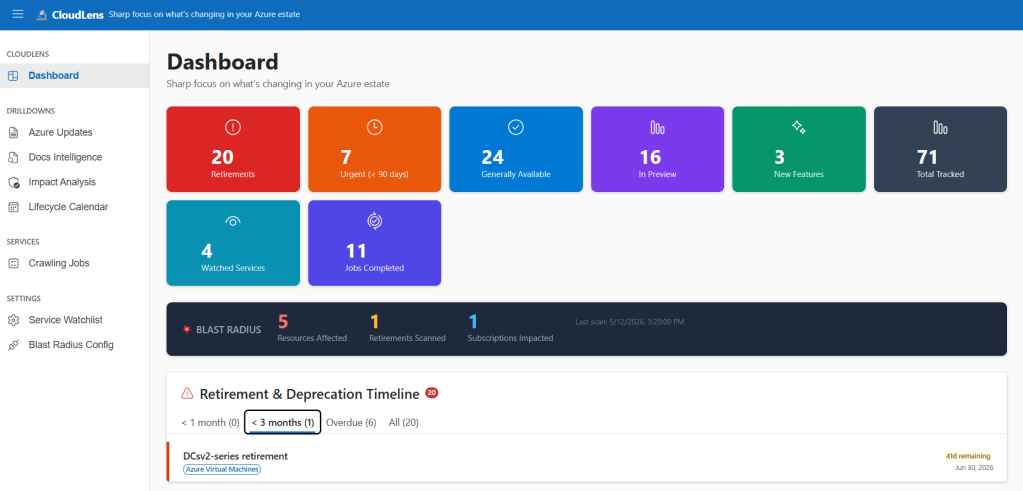
The big idea: stop scraping, start asking
The single most important change in AzRadar v2 is philosophical:
We stopped scraping RSS feeds and started talking to MCP servers.
If you haven’t bumped into MCP (Model Context Protocol) yet, the short version is: it’s a standard way for AI applications to call tools on remote servers — search, fetch, list, query — in a uniform, typed, agent-friendly way. Microsoft has been quietly lighting up MCP endpoints across its product surface, and two of them changed how AzRadar works:
| Source | MCP endpoint | What it gives us |
|---|---|---|
| Microsoft Release Communications (the canonical Azure Updates feed) | microsoft.com/releasecommunications/mcp | Structured update items with metadata, not HTML soup |
| MS Learn | learn.microsoft.com/api/mcp | Search + fetch over the entire Microsoft Learn corpus |
The difference is night and day. The old RSS path looked like this:
RSS XML → regex-and-prayer parsing → "please GPT, figure out what this means"
The MCP path looks like this:
// Pseudo-code of how the AzureUpdatesJobHandler now works
var mcpClient = new McpClient("https://microsoft.com/releasecommunications/mcp");
var updates = await mcpClient.CallToolAsync("list_updates", new {
    since = lastSyncTimestamp,
    categories = new[] { "retirement", "deprecation", "breaking-change" }
});

foreach (var update in updates)
{
    // No more HTML-stripping. The fields are already there.
    var analysis = await _llm.AnalyzeAsync(update);
    await _cosmos.UpsertFeedItemAsync(update, analysis);
}
The LLM now gets to spend its tokens on judgement (severity, blast radius, action plans) instead of on janitorial work (parsing markup). Costs went down. Quality went up.
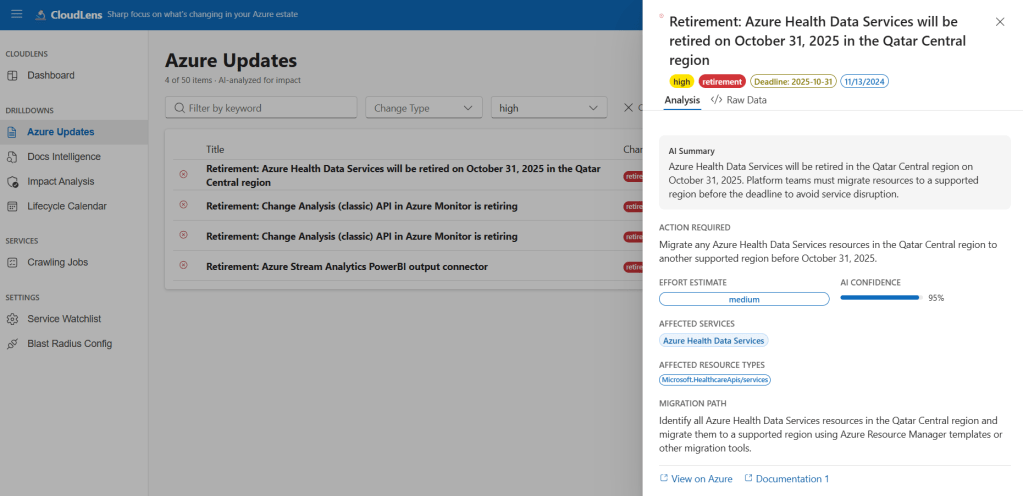
MS Learn as a first-class signal
This one surprised me. The Azure Updates feed is great for announcements, but a huge amount of lifecycle intelligence lives in the docs themselves — minimum TLS versions quietly change, default SKUs get swapped, code samples get rewritten to use a new API version.
So AzRadar now treats MS Learn as a monitored data source. Customers maintain a watchlist of services they care about (Microsoft.Cache/redis, Microsoft.ContainerService/managedClusters, Microsoft.Web/sites…), and the MsLearnIntelligenceJobHandler does this on a schedule:
- Use MS Learn MCP
searchfor each watchlisted service. fetchthe top documents.- SHA-256 hash the content.
- Only re-run the LLM analysis if the hash changed.
That last step is the difference between a $10/month OpenAI bill and a $1,000/month one.
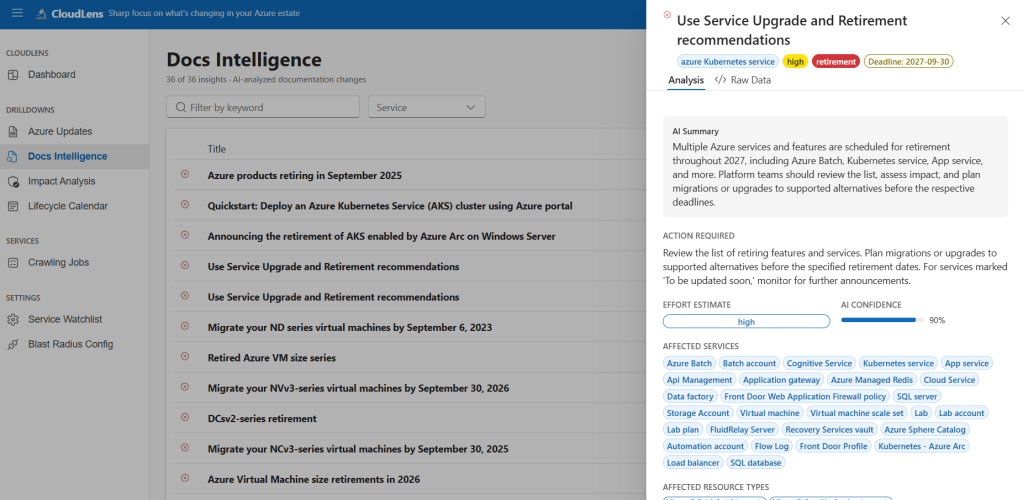
The headline feature: 💥 Blast Radius
Knowing about a change is table stakes. The question every platform engineer actually wants answered is:
“Yes, but does it hit us?”
This is where AzRadar v2 earns its keep. For every retirement / deprecation / breaking-change, a dedicated BlastRadiusJobHandler does something that still feels slightly magical to me:
- Asks GPT-4o to write a Kusto query against Azure Resource Graph (ARG) that would find the affected resources in your tenant.
- Runs the query via
ResourceGraphClient(authenticated with a User-Assigned Managed Identity — no keys, ever). - If the query errors (LLMs do occasionally hallucinate a column name), feeds the error back to the LLM and asks it to try again. Up to three attempts.
- Stores a
BlastRadiusSummarywith the totals, per-subscription breakdown, per-region breakdown, and the top 20 affected resources.
Every step — the prompt, the generated KQL, the ARG response, the retries — gets persisted as job diagnostics, so the UI can show exactly what happened. No black box.
A simplified version of the loop:
for (var attempt = 1; attempt <= 3; attempt++)
{
    var kql = await _llm.GenerateArgQueryAsync(feedItem, previousError);
    diagnostics.Record("kql-generated", kql);

    try
    {
        var result = await _resourceGraph.QueryAsync(kql);
        diagnostics.Record("kql-success", $"{result.Count} resources");
        return BlastRadiusSummary.From(result);
    }
    catch (ResourceGraphException ex)
    {
        previousError = ex.Message;
        diagnostics.Record($"kql-error-attempt-{attempt}", ex.Message);
    }
}
And the payoff in the UI looks like this:
╔══════════════════════════════════════════════════════════════╗║ IMPACT: Azure Cache for Redis — TLS 1.0/1.1 Retirement║║ 💥 47 Redis instances · 23 subscriptions · 2 regions║ ⏰ Deadline: 2026-09-30 (198 days)║ 🔴 Effective severity: CRITICAL║║ Top regions: West Europe (38), North Europe (9)║ Top subscriptions: prod-platform (12), prod-payments (8)…╚══════════════════════════════════════════════════════════════╝
A platform engineer can go from “there’s a retirement announcement” to “here are the 47 specific resources we need to fix, grouped by subscription, sorted by deadline” in one click. That used to be a two-day Excel exercise.
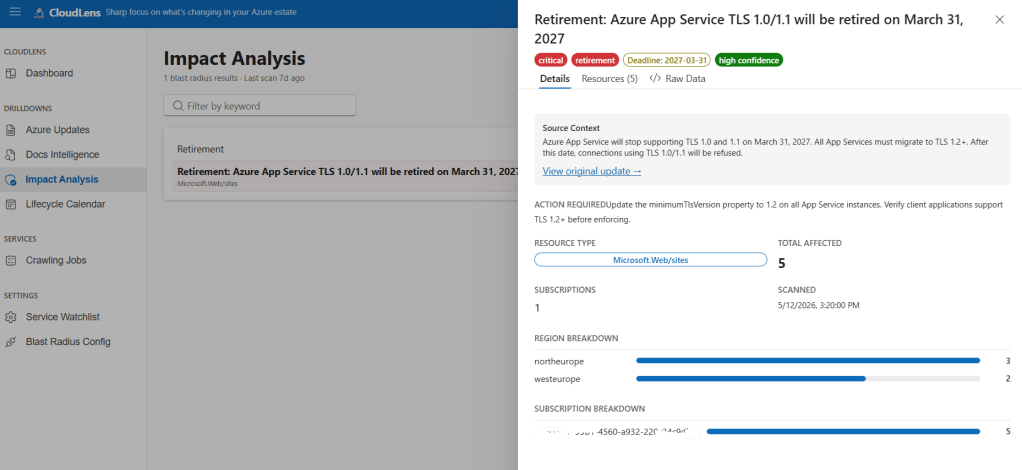
Lifecycle Calendar — the “Oh god, what’s due in Q3?” view
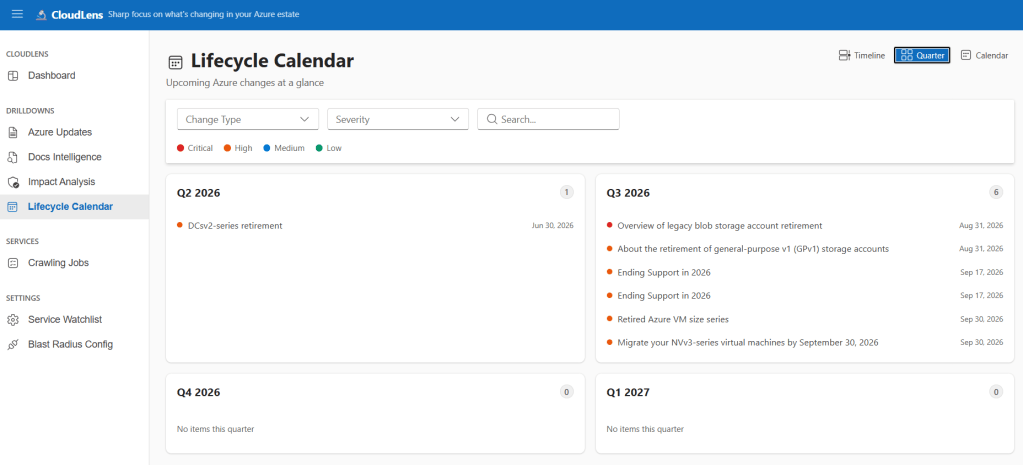
All this structured data unlocked something the original POC couldn’t even dream of: a real lifecycle calendar. Filter by service, change type, severity, month/quarter/year — every item carries its deadline and effective severity. The kind of view that makes a CTO stop asking “are we ready?” and start asking “why is that one still red?” (which, frankly, is a much better problem to have).
How it all hangs together
The architecture is deliberately boring, which is a feature:
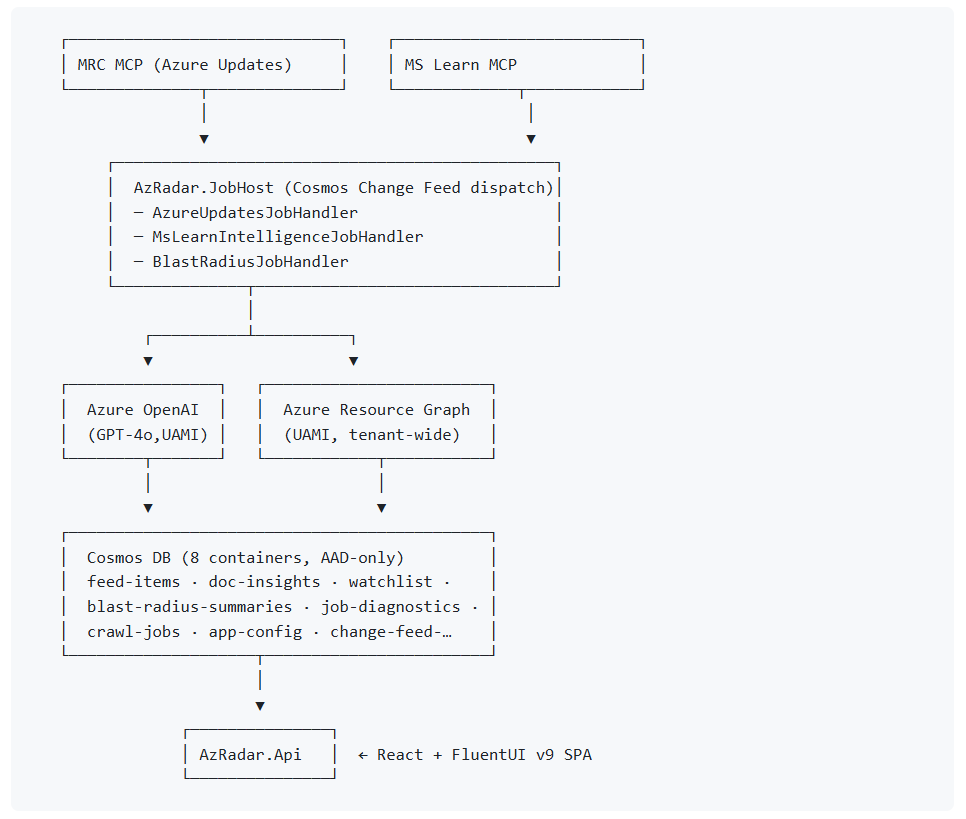
A few principles I’d call out:
- Zero keys. Every Azure service-to-service hop — Cosmos, OpenAI, Resource Graph — uses a User-Assigned Managed Identity. No connection strings. No
--keyflags. No 2am rotation incidents. - Job handlers are pluggable. Adding a new data source means implementing one
IJobHandlerinterface and registering it in DI. The Change Feed dispatcher routes byjobTypeautomatically. - Everything is auditable. Every job run leaves a diagnostics trail. Every blast-radius scan saves the exact KQL it generated. If you can’t show your work, you’re not really doing the work.
- Blue/green Docker tags. No
:latest. Ever. (Past me made that mistake. Past me deserved what happened next.)
What’s next
Two big things are on the immediate roadmap, both driven by real customer conversations:
- “Applies to me” filtering. Today the Calendar and Updates pages show every Azure change. With blast-radius data flowing, we can default the view to “items that touch your estate” and re-rank severity based on actual deployed-resource counts and deadline proximity. From 200 items per week down to ~20.
- Smart Notification Router. Push lifecycle signals into Microsoft Teams, ServiceNow, and email digests — with dedup, dry-run mode, and a full delivery ledger. Because “sorry, I was on vacation” shouldn’t be a valid reason for a missed retirement deadline.
The 2024 POC and AzRadar v2 are both, on paper, “AI tools that summarise Azure changes.” But the gap between them is the gap between scraping HTML and calling typed tools, between summarising one item and measuring its blast radius across your whole tenant, between “here’s what Azure said” and “here’s what you need to do, on which 47 resources, by when.”
MCP didn’t just give us cleaner inputs. It gave us back the compute budget to do the interesting work: querying your actual estate, reasoning about impact, and surfacing the small subset of changes that genuinely matter.
If you’re a platform engineer drowning in Azure update emails, Source is on GitHub at MoimHossain/az-radar.
And the next time someone tells you the answer to an AI problem is “more prompt engineering”… consider that maybe the answer is better tools at the other end of the wire.


