March 2026 · .NET 8+ · GitHub Copilot SDK (Technical Preview)
What if you could get the full agentic power of GitHub Copilot — tool calling, multi-turn sessions, streaming, automatic context compaction — but run it on your own infrastructure, with your own models, and no GitHub dependency at runtime?
That’s exactly what the GitHub Copilot SDK enables through its BYOK (Bring Your Own Key) mode. In this post, I’ll walk through how to stand up a .NET agent service on Azure Container Apps that uses an Azure AI Foundry-hosted model, authenticated via Managed Identity — no API keys, no GitHub tokens.
What is the GitHub Copilot SDK?
The GitHub Copilot SDK is a multi-platform SDK (C#/.NET, TypeScript, Python, Go) currently in technical preview. It gives you programmatic control over the Copilot CLI, which acts as a standalone agent runtime — think of it as the brains behind tool orchestration, session management, and model routing, packaged as a process your app talks to.
Key capabilities (official docs):
| Capability | Description |
|---|---|
| Multi-turn conversations | Stateful sessions with automatic context window management |
| Tool / function calling | Register C# methods as tools via Microsoft.Extensions.AI |
| Streaming | Low-latency token-by-token responses |
| Infinite sessions | Background context compaction so conversations never hit a token wall |
| Session hooks | Intercept prompts, tool calls, errors — full lifecycle control |
| BYOK | Swap GitHub-hosted models for OpenAI, Azure AI Foundry, Anthropic, or even local Ollama |
The SDK communicates with the Copilot CLI over JSON-RPC (stdio or TCP). The CLI can run as a child process spawned by the SDK, or as a headless server that your app connects to over the network — the pattern we’ll use for Azure Container Apps.
📖 For a deeper feature walkthrough, see GitHub Copilot SDK for .NET: Complete Developer Guide by DevLeader and Building Custom AI Tooling with the GitHub Copilot SDK by Benjamin Abt.
Architecture Overview
Here’s the target architecture we’re building:
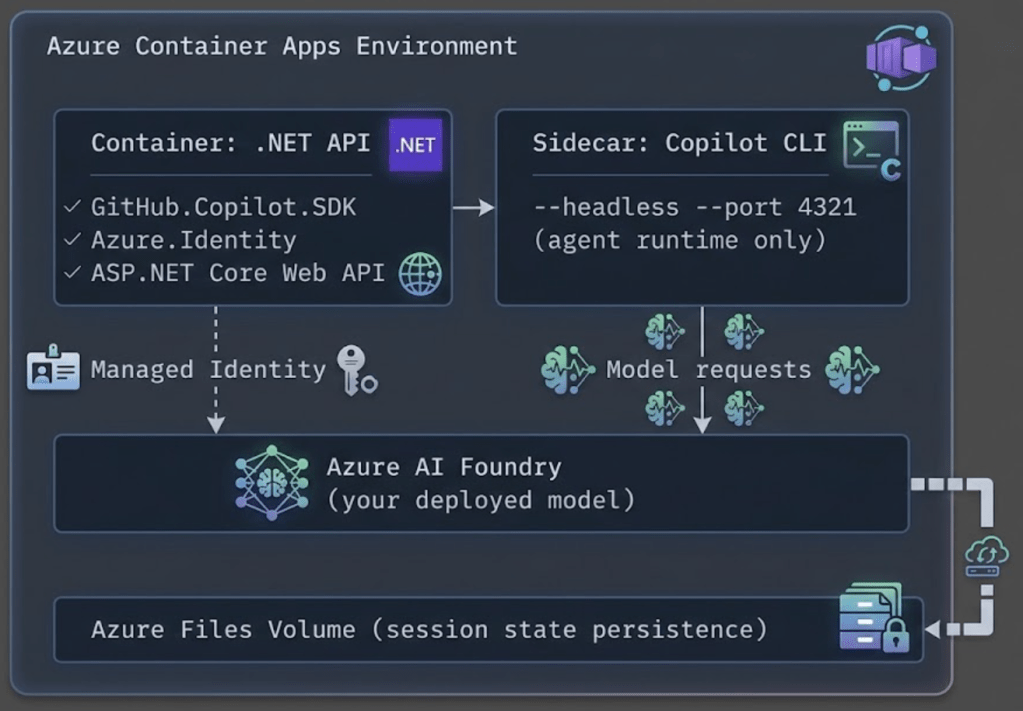
Key design choices:
- The Copilot CLI runs as a sidecar container in headless mode — separate lifecycle from your app.
- Your .NET API connects to the CLI over TCP (
CliUrl = "localhost:4321"). - Authentication to Azure AI Foundry uses Managed Identity via
DefaultAzureCredential— no secrets stored anywhere. - In BYOK mode, no GitHub token or Copilot subscription is needed. The CLI is purely an agent runtime.
Step-by-Step Setup
Step 1: Create the .NET Project
dotnet new webapi -n CopilotAgent
cd CopilotAgent
dotnet add package GitHub.Copilot.SDK
dotnet add package Azure.Identity
dotnet add package Microsoft.Extensions.AI
Step 2: Build the Agent Service
Create a service that manages Copilot sessions with automatic token refresh:
// Services/CopilotAgentService.cs
using Azure.Identity;
using GitHub.Copilot.SDK;
using Microsoft.Extensions.AI;
using System.ComponentModel;

public class CopilotAgentService : IAsyncDisposable
{
    private readonly CopilotClient _client;
    private readonly DefaultAzureCredential _credential = new();
    private readonly string _foundryUrl;
    private readonly string _model;

    private const string CognitiveServicesScope =
        "https://cognitiveservices.azure.com/.default";

    public CopilotAgentService(IConfiguration config)
    {
        _foundryUrl = config["AzureAIFoundry:Endpoint"]!.TrimEnd('/');
        _model = config["AzureAIFoundry:Model"] ?? "gpt-4.1";

        _client = new CopilotClient(new CopilotClientOptions
        {
            CliUrl = config["CopilotCli:Url"] ?? "localhost:4321",
            UseStdio = false,
        });
    }

    public async Task<string?> RunAgentAsync(string prompt, string sessionId)
    {
        // Get a fresh bearer token from Managed Identity
        var token = await _credential.GetTokenAsync(
            new Azure.Core.TokenRequestContext(
                new[] { CognitiveServicesScope }));

        await using var session = await _client.CreateSessionAsync(new SessionConfig
        {
            SessionId = sessionId,
            Model = _model,
            Provider = new ProviderConfig
            {
                Type = "openai",
                BaseUrl = $"{_foundryUrl}/openai/v1/",
                BearerToken = token.Token,
                WireApi = "responses",
            },
            // Register custom tools the agent can call
            Tools =
            [
                AIFunctionFactory.Create(
                    ([Description("Search query")] string query) =>
                        SearchInternalDocs(query),
                    "search_docs",
                    "Search internal documentation"),
            ],
        });

        var response = await session.SendAndWaitAsync(
            new MessageOptions { Prompt = prompt });

        return response?.Data.Content;
    }

    private static string SearchInternalDocs(string query)
    {
        // Your implementation here
        return $"Results for: {query}";
    }

    public async ValueTask DisposeAsync()
    {
        await _client.StopAsync();
    }
}
Step 3: Wire Up the API Endpoint
// Program.cs
var builder = WebApplication.CreateBuilder(args);

builder.Services.AddSingleton<CopilotAgentService>();

var app = builder.Build();

app.MapPost("/api/chat", async (
    CopilotAgentService agent,
    ChatRequest request) =>
{
    var sessionId = $"session-{request.UserId}-{DateTimeOffset.UtcNow.ToUnixTimeSeconds()}";
    var result = await agent.RunAgentAsync(request.Message, sessionId);
    return Results.Ok(new { content = result });
});

app.Run();

record ChatRequest(string UserId, string Message);
Step 4: Configure appsettings.json
{
  "AzureAIFoundry": {
    "Endpoint": "https://your-resource.openai.azure.com",
    "Model": "gpt-4.1"
  },
  "CopilotCli": {
    "Url": "localhost:4321"
  }
}
Step 5: Create the Dockerfile
FROM mcr.microsoft.com/dotnet/sdk:8.0 AS build
WORKDIR /src
COPY . .
RUN dotnet publish -c Release -o /app

FROM mcr.microsoft.com/dotnet/aspnet:8.0
WORKDIR /app
COPY --from=build /app .
EXPOSE 8080
ENTRYPOINT ["dotnet", "CopilotAgent.dll"]
Step 6: Deploy Infrastructure with Bicep
Here are the key Bicep fragments for the Azure resources. These are the important pieces — wire them into your existing IaC as needed.
6a. Azure AI Foundry (Cognitive Services) Resource
// infra/ai-foundry.bicep

param location string = resourceGroup().location
param aiFoundryName string

resource aiFoundry 'Microsoft.CognitiveServices/accounts@2024-10-01' = {
  name: aiFoundryName
  location: location
  kind: 'OpenAI'
  sku: { name: 'S0' }
  properties: {
    customSubDomainName: aiFoundryName
    publicNetworkAccess: 'Enabled'
  }
}

// Deploy a model
resource modelDeployment 'Microsoft.CognitiveServices/accounts/deployments@2024-10-01' = {
  parent: aiFoundry
  name: 'gpt-4-1'
  sku: {
    name: 'Standard'
    capacity: 30
  }
  properties: {
    model: {
      format: 'OpenAI'
      name: 'gpt-4.1'
    }
  }
}

output aiFoundryEndpoint string = aiFoundry.properties.endpoint
output aiFoundryId string = aiFoundry.id
6b. Container Apps Environment and App with Managed Identity
// infra/container-app.bicep

param location string = resourceGroup().location
param containerAppName string
param environmentName string
param aiFoundryEndpoint string
param aiFoundryId string
param acrLoginServer string
param acrName string

// Container Apps Environment
resource containerEnv 'Microsoft.App/managedEnvironments@2024-03-01' = {
  name: environmentName
  location: location
  properties: {
    appLogsConfiguration: {
      destination: 'azure-monitor'
    }
  }
}

// Azure Files storage for session state
resource sessionStorage 'Microsoft.App/managedEnvironments/storages@2024-03-01' = {
  parent: containerEnv
  name: 'session-state'
  properties: {
    azureFile: {
      accountName: storageAccount.name
      accountKey: storageAccount.listKeys().keys[0].value
      shareName: 'copilot-sessions'
      accessMode: 'ReadWrite'
    }
  }
}

// The Container App
resource containerApp 'Microsoft.App/containerApps@2024-03-01' = {
  name: containerAppName
  location: location
  identity: {
    type: 'SystemAssigned'   // Managed Identity — no secrets needed
  }
  properties: {
    managedEnvironmentId: containerEnv.id
    configuration: {
      ingress: {
        external: true
        targetPort: 8080
      }
      registries: [
        {
          server: acrLoginServer
          identity: 'system'
        }
      ]
    }
    template: {
      // --- Main container: your .NET API ---
      containers: [
        {
          name: 'api'
          image: '${acrLoginServer}/copilot-agent:latest'
          resources: {
            cpu: json('0.5')
            memory: '1Gi'
          }
          env: [
            { name: 'AzureAIFoundry__Endpoint', value: aiFoundryEndpoint }
            { name: 'AzureAIFoundry__Model',    value: 'gpt-4.1' }
            { name: 'CopilotCli__Url',          value: 'localhost:4321' }
          ]
        }
        // --- Sidecar container: Copilot CLI in headless mode ---
        {
          name: 'copilot-cli'
          image: 'ghcr.io/github/copilot-cli:latest'
          args: [ '--headless', '--port', '4321' ]
          resources: {
            cpu: json('0.5')
            memory: '1Gi'
          }
          volumeMounts: [
            {
              volumeName: 'session-state'
              mountPath: '/root/.copilot/session-state'
            }
          ]
        }
      ]
      volumes: [
        {
          name: 'session-state'
          storageName: 'session-state'
          storageType: 'AzureFile'
        }
      ]
      scale: {
        minReplicas: 1
        maxReplicas: 5
        rules: [
          {
            name: 'http-scaling'
            http: { metadata: { concurrentRequests: '20' } }
          }
        ]
      }
    }
  }
}

// Grant Managed Identity access to Azure AI Foundry
resource cognitiveServicesRole 'Microsoft.Authorization/roleAssignments@2022-04-01' = {
  name: guid(containerApp.id, aiFoundryId, 'CognitiveServicesUser')
  scope: resourceGroup()
  properties: {
    roleDefinitionId: subscriptionResourceId(
      'Microsoft.Authorization/roleDefinitions',
      'a97b65f3-24c7-4388-baec-2e87135dc908'  // Cognitive Services User
    )
    principalId: containerApp.identity.principalId
    principalType: 'ServicePrincipal'
  }
}
The critical thing to notice above: there are no API keys or GitHub tokens in any environment variable. The system-assigned Managed Identity handles authentication to Azure AI Foundry, and BYOK mode means no GitHub auth is needed.
6c. Supporting Storage Account
// infra/storage.bicep

param location string = resourceGroup().location
param storageAccountName string

resource storageAccount 'Microsoft.Storage/storageAccounts@2023-01-01' = {
  name: storageAccountName
  location: location
  sku: { name: 'Standard_LRS' }
  kind: 'StorageV2'
  properties: {}
}

resource fileService 'Microsoft.Storage/storageAccounts/fileServices@2023-01-01' = {
  parent: storageAccount
  name: 'default'
}

resource fileShare 'Microsoft.Storage/storageAccounts/fileServices/shares@2023-01-01' = {
  parent: fileService
  name: 'copilot-sessions'
  properties: {
    shareQuota: 5   // GB
  }
}
BYOK: Bring Your Own Foundry Model
The BYOK model is the core enabler for this entire architecture. Here’s how the authentication flow works without any GitHub dependency:
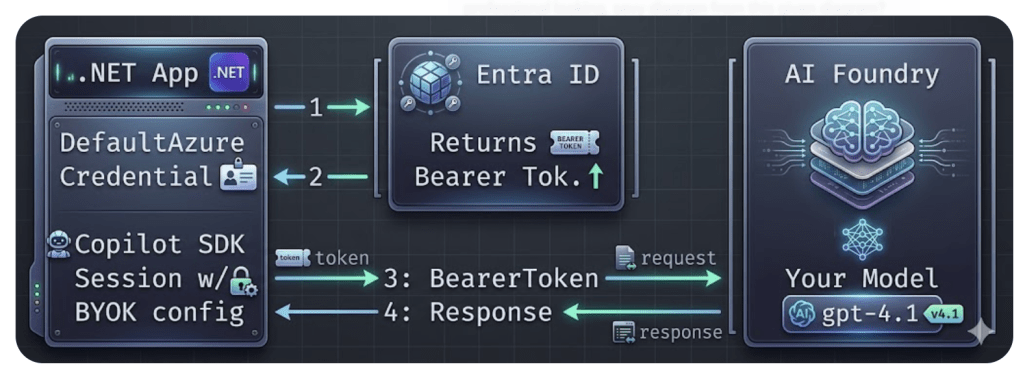
- Your app calls
DefaultAzureCredential.GetTokenAsync()— which uses the Container App’s Managed Identity automatically. - Entra ID returns a short-lived bearer token (~1 hour).
- The SDK session passes the token to Azure AI Foundry via the
BearerTokenfield inProviderConfig. - Model responses flow back through the Copilot CLI agent runtime to your app.
No GitHub token. No API key. No secrets in config.
The Code — Minimal BYOK Session
using Azure.Identity;
using GitHub.Copilot.SDK;

var credential = new DefaultAzureCredential();
var token = await credential.GetTokenAsync(
    new Azure.Core.TokenRequestContext(
        new[] { "https://cognitiveservices.azure.com/.default" }));

await using var client = new CopilotClient(new CopilotClientOptions
{
    CliUrl = "localhost:4321",
    UseStdio = false,
});

await using var session = await client.CreateSessionAsync(new SessionConfig
{
    Model = "gpt-4.1",
    Provider = new ProviderConfig
    {
        Type = "openai",
        BaseUrl = "https://your-resource.openai.azure.com/openai/v1/",
        BearerToken = token.Token,
        WireApi = "responses",
    },
});

var response = await session.SendAndWaitAsync(
    new MessageOptions { Prompt = "Summarize our Q1 sales data." });
Console.WriteLine(response?.Data.Content);
What You Keep vs. What You Lose
| ✅ You Keep | ⚠️ You Lose |
|---|---|
| Full agent runtime (tool calling, hooks) | GitHub-specific context awareness |
| Multi-turn sessions with compaction | Copilot-tuned model optimizations |
| Streaming responses | Built-in copyright/security filters |
| System message customization | GitHub skill integrations |
| File & image attachments |
For enterprise workloads where you need data residency, cost control, and compliance — this is the right trade-off. You own the model, you own the data flow, and you still get a world-class agent runtime.
📖 Full BYOK documentation: Official BYOK Setup Guide · Azure Managed Identity Guide
Conclusion
The GitHub Copilot SDK’s BYOK mode unlocks a powerful pattern: use the battle-tested Copilot agent runtime with your own models, on your own infrastructure, with zero GitHub runtime dependency.
Here’s what makes this combination compelling:
- Azure AI Foundry gives you enterprise-grade model hosting with full control over data residency, fine-tuning, and model selection.
- Managed Identity eliminates secrets management entirely –
DefaultAzureCredentialjust works in Azure Container Apps. - The Copilot SDK provides the agent runtime you’d otherwise have to build from scratch: session management, tool calling, context compaction, streaming, and hooks.
- Azure Container Apps gives you serverless container hosting with built-in scaling, ingress, and volume mounts for session state.
The result is an AI agent service that’s secure by default, scales automatically, and costs you only what your Azure model usage incurs — no GitHub Copilot subscription required.
⚠️ Note: The GitHub Copilot SDK is in technical preview. APIs may change. Watch the releases page and test thoroughly before production use.
Further Reading
- GitHub Copilot SDK Repository
- Backend Services Deployment Guide
- Scaling & Multi-Tenancy Guide
- GitHub Copilot SDK for .NET: Complete Developer Guide — DevLeader
- Building Custom AI Tooling with the Copilot SDK — Benjamin Abt
- GitHub Copilot BYOK Enhancements (Jan 2026)
- Microsoft Learn: GitHub Copilot Agents

 Reverse Engineering
How to invoke github cli hosted on localhost via sdk?
LikeLike