This post shows how to add an AI assistant plugin to Backstage that lets internal developers chat with their own domain data using Azure AI Foundry Agents. We cover agent concepts, minimal API usage, plugin structure (frontend + lightweight backend proxy), security (secrets & identity), and deployment guidance.
1. Why an AI Chat Plugin in Backstage?
Backstage is the natural hub for internal dev workflows (catalog, templates, docs). Embedding an AI agent there:
Removes context switching (ask infra / service questions in‑portal)
Surfaces curated organizational knowledge (vector / index retrieval)
Enables secure, auditable interactions over internal data
2. Azure AI Foundry Agents (Overview)
Azure AI Foundry (successor to Azure OpenAI studio + broader orchestration) introduces an Agents capability: a managed orchestration layer that couples foundation models (GPT, Phi, etc.), tools, retrieval (vector / hybrid), and multi‑turn state.
Key ideas:
Agent: Stateful chat orchestrator bound to a model + optional knowledge (indexes) + tools.
POST https://<endpoint>/openai/agents/<agentId>/threads?api-version=2024-05-01-preview
{}
POST https://<endpoint>/openai/agents/<agentId>/threads/<threadId>/messages?api-version=2024-05-01-preview
{ "role": "user", "content": "How do I deploy the payments service?" }
POST https://<endpoint>/openai/agents/<agentId>/threads/<threadId>/runs?api-version=2024-05-01-preview
{ "type": "auto" }
GET https://<endpoint>/openai/agents/<agentId>/threads/<threadId>/messages?api-version=2024-05-01-preview
Exact version / schema may evolve—always check the latest Azure AI Foundry REST reference.
2.2 Authentication
Recommended hierarchy:
Managed Identity (system or user-assigned) when plugin backend runs in Azure (Container Apps / AKS / App Service).
Workload Identity Federation (CI/CD pipelines, GitHub OIDC) for deployments.
Azure Entra App Registration + client secret only if above not available (store secret in Key Vault, inject at runtime).
Use the latest @azure/identity and (when GA) dedicated Agents SDK; until then, call REST with a token from DefaultAzureCredential.
3. Target User Flow
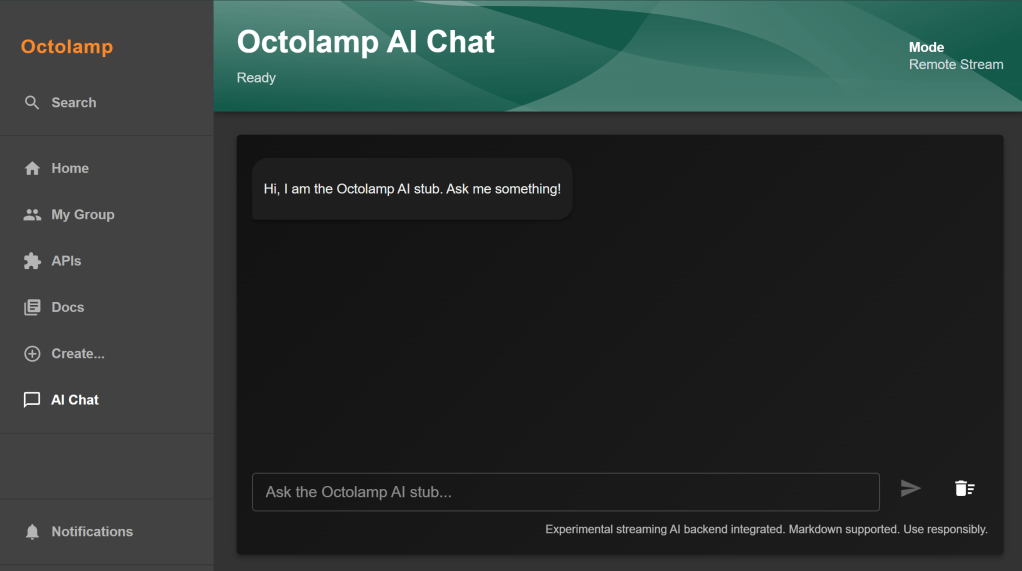
Developer opens Backstage → AI Chat tab.
A thread is created (or resumed) per user session.
User types a question; frontend calls Backstage backend endpoint /api/ai-chat/send.
Backend ensures (or lazily creates) agent + thread, sends user message and run request.
Polls or streams assistant response, returns incremental tokens to UI.
UI renders messages (user/assistant), shows typing indicator and sources (citations) if present.
We add a lightweight backend extension route (either inside packages/backend/src or as a backend plugin) to proxy secure calls to Azure AI Foundry, shielding tokens and enabling managed identity.
5. Backend Proxy (C# Minimal API with Streaming – Existing Implementation)
Instead of a Node/Express proxy, this repository uses a .NET 10 minimal API (server/AgentApi) plus a FoundryAgentService that wraps the Azure AI Foundry (Persistent Agents) SDK. This service:
Azure AI Foundry project endpoint (e.g. https://myproj.eastus.projects.azure.ai)
AI_FOUNDRY_AGENT_ID
Pre‑created Agent ID in Foundry (binds model + retrieval)
AI_FOUNDRY_TENANT_ID
Entra tenant for credential resolution
AI_FOUNDRY_MANAGED_IDENTITY_CLIENT_ID
Client ID of user/system assigned managed identity
Using DefaultAzureCredential lets you seamlessly authenticate with Managed Identity in Container Apps / App Service and fall back locally to developer credentials.
5.3 Agent Streaming Service (FoundryAgentService.cs excerpt)
public async IAsyncEnumerable<object> StreamAgentResponseAsync(
		string userMessage,
		[EnumeratorCancellation] CancellationToken cancellationToken = default)
{
		var thread = await _agentsClient.Threads.CreateThreadAsync();
		await _agentsClient.Messages.CreateMessageAsync(thread.Id, MessageRole.User, userMessage, cancellationToken: cancellationToken);

		var streamingResult = _agentsClient.Runs.CreateRunStreamingAsync(thread.Id, _agentId);
		await foreach (StreamingUpdate update in streamingResult) {
				cancellationToken.ThrowIfCancellationRequested();
				if (update is MessageContentUpdate contentUpdate && !string.IsNullOrEmpty(contentUpdate.Text)) {
						var citations = TryGetPrivateTextContent(contentUpdate); // extracts URI citation annotations
						yield return new { contentUpdate.Text, Citations = citations };
				}
		}
}
5.4 Citations Extraction
Because current SDK types encapsulate annotations privately, reflection is (temporarily) used to surface citation annotations for the UI. This enables future rendering of “Sources” below each assistant response.
5.5 Why This Approach
Aspect
Benefit
Streaming SSE
Low latency token display; good UX for longer answers
Managed Identity
No secrets at rest; rotates automatically
New thread per request
Statelesness keeps API simple (can evolve to session persistence later)
Azure SDK (Persistent Agents)
Offloads orchestration/state to platform
5.6 Frontend Integration Note
Your Backstage frontend simply opens an EventSource (or fetch stream) to /api/agents/chat and appends JSON objects until { "Completed": true } arrives. (The earlier TypeScript polling example is now superseded by this streaming C# backend.)
Production additions: per-user thread continuity, rate limiting, OpenTelemetry spans (wrapping thread creation + run streaming), exponential backoff on transient RequestFailedException, and circuit breaker around sustained failures.
6. Frontend Chat Page (Snippet Highlights)
Example from plugins/ai-chat/components/ChatPage/ChatService.ts conceptually:
export async function sendMessage(text: string): Promise<string> {
	const resp = await fetch('/api/ai-chat/send', {
		method: 'POST',
		headers: { 'Content-Type': 'application/json' },
		body: JSON.stringify({ message: text }),
	});
	if (!resp.ok) throw new Error('Send failed');
	const data = await resp.json();
	return data.reply;
}
UI controller hook (useChatController.ts) maintains an array of { role, content } and optimistic state while awaiting backend reply.
Message list & input components handle scroll and enter-to-send; typing indicator displays while polling.
Attach an Azure AI Search / vector index (outside this snippet) when creating the agent, passing retrieval configuration. After that, agent responses automatically ground answers. Cite sources by surfacing metadata in assistant message payload (check annotations / citations fields when available) and render links below each answer.
You integrated a secure, minimal AI chat experience in Backstage using Azure AI Foundry Agents. The backend proxy leverages managed identity (or fallback credentials), orchestrates agent lifecycle, and streams responses to a clean React UI. From here you can attach retrieval, citations, function calling, and enterprise governance—turning Backstage into a central AI enablement surface.

 Reverse Engineering