End-to-end guide: containerizing Backstage, provisioning Azure resources (with Bicep & CLI), enabling Microsoft Entra (formerly Azure AD) sign-in, managing secrets, scaling, observing, troubleshooting, and cleaning up — all aligned with current Azure best practices (managed identities, least privilege, and no hard‑coded secrets).

Why Backstage + Azure Container Apps
Backstage centralizes your internal developer portal (catalog, software templates, tech docs, plugins) and Azure Container Apps (ACA) gives you:
- Fully managed serverless containers (no direct Kubernetes ops)
- Easy external HTTPS ingress, revisions, blue/green style rollouts
- Built-in Dapr & KEDA scaling primitives (HTTP, CPU, events)
- First-class managed identity for pulling images & accessing other Azure services
This combination lets platform engineers ship a secure, scalable internal portal quickly.
High-Level Architecture
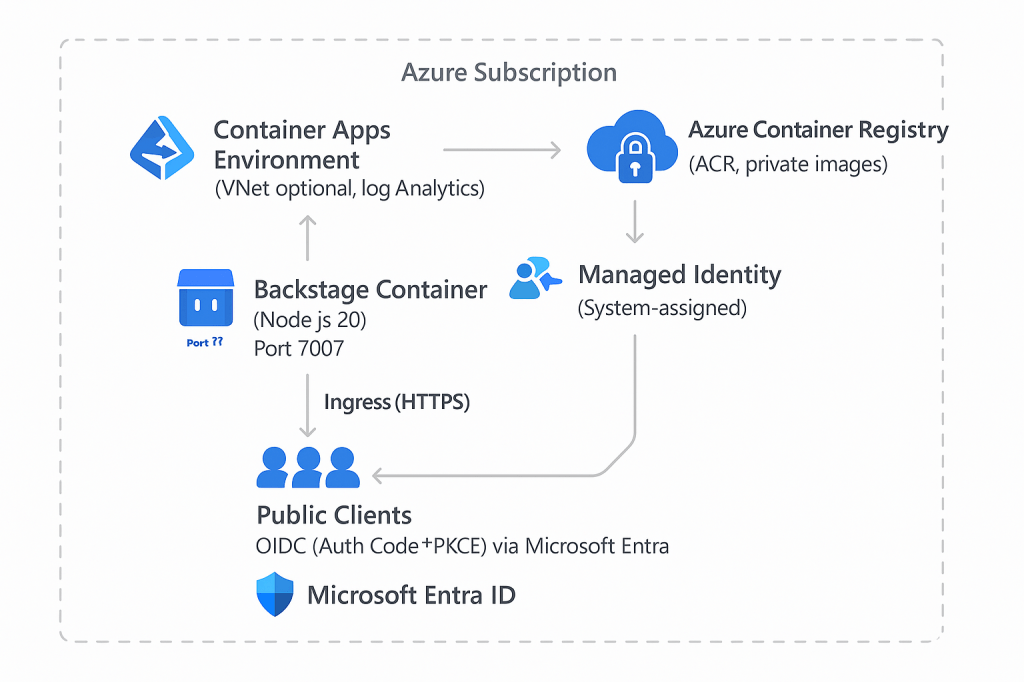
Prerequisites
| Area | Requirement |
|---|---|
| Local | Node.js 20+, Docker, PowerShell 7 (pwsh) or Azure Cloud Shell |
| Azure | Subscription + RBAC: Owner or Contributor + User Access Admin (for role assignments) |
| CLI | Latest az CLI (az upgrade), containerapp extension (az extension add -n containerapp) |
| Identity | Permissions to register apps in Microsoft Entra ID |
| Source | This Backstage repo (already contains a Dockerfile) |
Optional: GitHub personal access token for catalog ingestion, Azure Key Vault for secret management.
Backstage Configuration Overview
We will:
- Add Microsoft auth provider to
app-config.yaml/app-config.production.yaml. - Externalize secrets via environment variables (and optionally Container Apps secrets / Key Vault).
- Set
app.baseUrlandbackend.baseUrlto the container FQDN.
Local Dev Auth Baseline
Add (or confirm) in app-config.local.yaml (dev only):
auth:
	environment: development
	providers:
		microsoft:
			development:
				clientId: ${AUTH_MICROSOFT_CLIENT_ID}
				clientSecret: ${AUTH_MICROSOFT_CLIENT_SECRET}
				tenantId: ${AUTH_MICROSOFT_TENANT_ID}
				# Adjust resolver if you map by email or sign-in rule
				signIn:
					resolvers:
						- resolver: emailMatchingUserEntityProfileEmail
Production Config Snippet (app-config.production.yaml)
app:
	baseUrl: https://<YOUR_CONTAINERAPP_FQDN>
backend:
	baseUrl: https://<YOUR_CONTAINERAPP_FQDN>
	listen:
		port: 7007
	cors:
		origin: https://<YOUR_CONTAINERAPP_FQDN>
		methods: [GET, HEAD, PUT, POST, DELETE, PATCH]
auth:
	environment: production
	providers:
		microsoft:
			production:
				clientId: ${AUTH_MICROSOFT_CLIENT_ID}
				clientSecret: ${AUTH_MICROSOFT_CLIENT_SECRET}
				tenantId: ${AUTH_MICROSOFT_TENANT_ID}
				signIn:
					resolvers:
						- resolver: emailMatchingUserEntityProfileEmail
The redirect URI Entra needs:
https://<YOUR_CONTAINERAPP_FQDN>/api/auth/microsoft/handler/frameLocal dev redirect:http://localhost:7007/api/auth/microsoft/handler/frame
Microsoft Entra ID (Azure AD) App Registration
- Go to Microsoft Entra admin center → App registrations → New registration.
- Name:
backstage-portal. - Supported account types: Single tenant (or multi-tenant if you choose).
- Redirect URIs (add both now or later):
- Web:
http://localhost:7007/api/auth/microsoft/handler/frame - Web:
https://<YOUR_CONTAINERAPP_FQDN>/api/auth/microsoft/handler/frame
- Web:
- After creation, capture:
- Application (client) ID → used as
AUTH_MICROSOFT_CLIENT_ID - Directory (tenant) ID →
AUTH_MICROSOFT_TENANT_ID
- Application (client) ID → used as
- Certificates & secrets → New client secret (store value securely; do not commit).
- (Optional) Expose an API if you’ll later protect backend APIs separately.
Security tips:
- Prefer Federated Identity Credentials (workload identity) for CI/CD (GitHub Actions) over client secrets.
- Rotate client secrets regularly; store in Key Vault.
Containerizing Backstage
If you modify the existing Dockerfile, keep a multi-stage build for smaller images and reproducibility:
# Stage 1: build
FROM node:20-bullseye-slim AS build
WORKDIR /app
COPY package.json yarn.lock ./
RUN corepack enable && yarn install --frozen-lockfile
COPY . .
RUN yarn tsc && yarn build:backend

# Stage 2: runtime (distilled)
FROM node:20-bullseye-slim
ENV NODE_ENV=production
WORKDIR /app
COPY --from=build /app/package.json /app/yarn.lock ./
COPY --from=build /app/node_modules ./node_modules
COPY --from=build /app/packages/backend/dist ./packages/backend/dist
COPY --from=build /app/app-config*.yaml ./
EXPOSE 7007
CMD ["node", "packages/backend/dist/index.cjs"]
Avoid baking secrets into images. Use environment variables in Container Apps referencing secrets.
Infrastructure as Code (Bicep) (Optional but Recommended)
Place under infra/main.bicep (example minimal set). Adjust names/locations as needed.
@description('Location for all resources')
param location string = resourceGroup().location
@description('Base name prefix')
param namePrefix string = 'backstage'

var acrName = toLower('${namePrefix}acr')
var envName = '${namePrefix}env'
var appName = '${namePrefix}portal'

// Container Registry
resource acr 'Microsoft.ContainerRegistry/registries@2023-01-01-preview' = {
	name: acrName
	location: location
	sku: { name: 'Basic' }
	properties: { adminUserEnabled: false }
}

// Log Analytics workspace
resource law 'Microsoft.OperationalInsights/workspaces@2022-10-01' = {
	name: '${namePrefix}-law'
	location: location
	properties: { retentionInDays: 30 }
	sku: { name: 'PerGB2018' }
}

// Container Apps Environment
resource cae 'Microsoft.App/managedEnvironments@2023-11-02-preview' = {
	name: envName
	location: location
	properties: {
		appLogsConfiguration: {
			destination: 'log-analytics'
			logAnalyticsConfiguration: {
				customerId: law.properties.customerId
				sharedKey: listKeys(law.id, law.apiVersion).primarySharedKey
			}
		}
	}
}

// Backstage secrets placeholder (client secret injected at deploy time via parameter)
@secure()
param microsoftClientSecret string
param microsoftClientId string
param microsoftTenantId string

resource backstageApp 'Microsoft.App/containerApps@2024-02-02-preview' = {
	name: appName
	location: location
	identity: { type: 'SystemAssigned' }
	properties: {
		managedEnvironmentId: cae.id
		configuration: {
			ingress: {
				external: true
				targetPort: 7007
			}
			registries: [
				{
					server: '${acr.name}.azurecr.io'
					identity: 'system'
				}
			]
			secrets: [
				{ name: 'auth-microsoft-client-secret'; value: microsoftClientSecret }
			]
			activeRevisionsMode: 'single'
			dapr: { enabled: false }
			environmentVariables: [
				{ name: 'AUTH_MICROSOFT_CLIENT_ID'; value: microsoftClientId }
				{ name: 'AUTH_MICROSOFT_TENANT_ID'; value: microsoftTenantId }
				{ name: 'AUTH_MICROSOFT_CLIENT_SECRET'; value: 'secretref:auth-microsoft-client-secret' }
				{ name: 'NODE_OPTIONS'; value: '--max_old_space_size=512' }
			]
		}
		template: {
			containers: [
				{
					name: 'backstage'
					image: '${acr.name}.azurecr.io/backstage:latest'
					resources: {
						cpu: 1
						memory: '2Gi'
					}
				}
			]
			scale: {
				minReplicas: 1
				maxReplicas: 3
				rules: [
					{
						name: 'http-concurrency'
						http: {
							concurrentRequests: 50
						}
					}
				]
			}
		}
	}
}

// Allow the container app identity to pull from ACR
resource acrPull 'Microsoft.Authorization/roleAssignments@2022-04-01' = {
	name: guid(backstageApp.id, 'acrpull')
	scope: acr
	properties: {
		principalId: backstageApp.identity.principalId
		roleDefinitionId: subscriptionResourceId('Microsoft.Authorization/roleDefinitions', '7f951dda-4ed3-4680-a7ca-43fe172d538d') // AcrPull
		principalType: 'ServicePrincipal'
	}
}
Deploy Bicep (Preview First)
$rg = 'rg-backstage'
$loc = 'eastus'
az group create --name $rg --location $loc
az deployment group what-if `
	--resource-group $rg `
	--template-file .\infra\main.bicep `
	--parameters namePrefix=backstage microsoftClientId='<CLIENT_ID>' microsoftTenantId='<TENANT_ID>' microsoftClientSecret='<CLIENT_SECRET>'

az deployment group create `
	--resource-group $rg `
	--template-file .\infra\main.bicep `
	--parameters namePrefix=backstage microsoftClientId='<CLIENT_ID>' microsoftTenantId='<TENANT_ID>' microsoftClientSecret='<CLIENT_SECRET>'
Build & Push Image
Using ACR and managed identity (once ACR exists):
$acr = 'backstageacr'  # from namePrefix
az acr login --name $acr
docker build -t $acr.azurecr.io/backstage:latest .
docker push $acr.azurecr.io/backstage:latest
If you skip Bicep, you can provision quickly with CLI (good for a POC):
$rg='rg-backstage'
$loc='eastus'
$env='backstage-env'
$acr='backstageacr'
az group create --name $rg --location $loc
az acr create -n $acr -g $rg --sku Basic
az acr login -n $acr
docker build -t $acr.azurecr.io/backstage:latest .
docker push $acr.azurecr.io/backstage:latest
az containerapp env create --name $env -g $rg --location $loc
az containerapp create `
	--name backstage-portal `
	--resource-group $rg `
	--environment $env `
	--image $acr.azurecr.io/backstage:latest `
	--target-port 7007 `
	--ingress external `
	--registry-server $acr.azurecr.io `
	--registry-identity system `
	--environment-variables `AUTH_MICROSOFT_CLIENT_ID=<CLIENT_ID> AUTH_MICROSOFT_TENANT_ID=<TENANT_ID> AUTH_MICROSOFT_CLIENT_SECRET=secretref:auth-microsoft-client-secret `
	--secrets auth-microsoft-client-secret=<CLIENT_SECRET>
Note: --registry-identity system automatically assigns/acquires AcrPull for the system-assigned identity (if supported). Otherwise, manually create the role assignment.
Retrieve FQDN & Update Redirect URI
$fqdn = az containerapp show -n backstage-portal -g $rg --query properties.configuration.ingress.fqdn -o tsv
Write-Host "Backstage URL: https://$fqdn"
Add https://$fqdn/api/auth/microsoft/handler/frame to your Entra app registration Redirect URIs (Web platform). Update app-config.production.yaml with baseUrl & redeploy if necessary.
Managing Secrets & Environment Variables
Azure Container Apps best practice: use --secrets (or Bicep secrets) & reference via secretref: in env vars. For multiple secrets (GitHub, catalog tokens):
az containerapp update -n backstage-portal -g $rg `
	--set-secrets github-token=<GH_PAT> `
	--set-env-vars GITHUB_TOKEN=secretref:github-token
If using Key Vault, fetch secret at CI/CD time and pass as a parameter (avoid runtime code pulling secret unless necessary to rotate frequently).
Scaling & Performance
- HTTP concurrency scaling rule example already included (50 concurrent requests → new replica).
- Add CPU-based rule:
az containerapp update -n backstage-portal -g $rg `
	--scale-rule-name cpu-scale `
	--scale-rule-type cpu `
	--scale-rule-metadata "type=Utilization" "value=70" "containerName=backstage"
- For background tasks/plugins with queue/event workloads, consider KEDA event sources (Azure Queue, Service Bus, etc.).
Resource sizing tips:
| Scenario | Suggested |
|---|---|
| PoC / small team | 1 vCPU / 2Gi RAM |
| Medium (~hundreds entities) | 2 vCPU / 4Gi RAM |
| Large (thousands + search plugins) | 2–4 vCPU / 8Gi RAM + external Postgres |
For production, externalize the Backstage database (Azure Postgres Flexible Server). Use managed identity or secure secret injection.
Observability
Query application logs (Log Analytics Workspace) after a few minutes:
ContainerAppConsoleLogs_CL
| where ContainerAppName_s == "backstage-portal"
| order by TimeGenerated desc
| take 50
Or via CLI (quick tail emulation):
az containerapp logs show -n backstage-portal -g $rg --follow
Add basic health route in Backstage (optional) to validate container liveness, or rely on default Node process exit codes.
Troubleshooting Quick Table
| Issue | Symptom | Resolution |
|---|---|---|
| Auth redirect mismatch | 400 / AADSTS50011 | Ensure FQDN redirect URI registered & matches case |
| Blank sign-in popup | Mixed content or wrong tenant | Confirm tenant ID and that HTTPS used |
| Image pull failure | CrashLoop / event shows auth failure | Verify AcrPull role; re-run role assignment or use --registry-identity system |
| 404 on /api/auth/microsoft | Missing provider config | Confirm auth.providers.microsoft section in prod config |
| Revisions not updating | Old config persists | Active revisions mode single; use az containerapp update or bump image tag |
| Secrets not visible | Env var empty | Must prefix with secretref: when referencing |
Cleanup
az group delete --name $rg -y --no-wait
Also remove redirect URIs you no longer need and rotate any credentials that were exposed in test scenarios.
Security Hardening Checklist
- [ ] Use Federated Identity (GitHub OIDC) instead of client secret for CI/CD push/deploy.
- [ ] Store long-lived secrets in Key Vault; inject at deploy time.
- [ ] Restrict Container Apps Environment networking (VNet + internal ingress if internal-only portal).
- [ ] Enable Azure Front Door / WAF for enterprise perimeter concerns & custom domains.
- [ ] Turn on Diagnostic Settings streaming to Log Analytics & (optional) Sentinel.
Optional Enhancements
| Enhancement | Benefit |
|---|---|
| External Postgres (Flexible Server) | Persistence & scale for catalog/search |
| Azure Cache for Redis | Session caching, plugin performance |
| Azure OpenAI / Cognitive Search plugins | Advanced search / AI chat integration |
| Dapr sidecar | Service discovery, pub/sub for custom plugins |
GitOps pipeline (Bicep + azd) | Repeatable environment provisioning |
References (Official Docs)
- Azure Container Apps: https://learn.microsoft.com/azure/container-apps/
- Deploy with
az containerapp up: https://learn.microsoft.com/azure/container-apps/containerapp-up - Environment variables & secrets: https://learn.microsoft.com/azure/container-apps/environment-variables
- Managed identities & ACR: https://learn.microsoft.com/azure/container-apps/tutorial-code-to-cloud
- Microsoft Entra redirect URIs: https://learn.microsoft.com/entra/identity-platform/how-to-add-redirect-uri
- Backstage Auth Providers: https://backstage.io/docs/auth/
Summary
You containerized Backstage, provisioned Azure infrastructure (either declaratively via Bicep or rapidly with CLI), enabled secure Microsoft Entra sign-in, applied managed identity for image pulls, and set up scaling and logging. This baseline is production-ready with a few strategic additions: external database, Key Vault, and network hardening.
Feel free to extend this with additional Backstage plugins (Software Templates, TechDocs, AI integrations) now that the platform shell is live on Azure Container Apps.

 Reverse Engineering