This feature is currently in public preview. This preview is provided without a service-level agreement, and we don't recommend it for production workloads. Certain features might not be supported or might have constrained capabilities.
Introduction
In today’s enterprise environment, accessing and leveraging organizational knowledge through natural conversation is becoming increasingly important.
Azure OpenAI GPT-4o Realtime API for speech and audio is part of the GPT-4o model family that supports low-latency, “speech in, speech out” conversational interactions.
You can use the Realtime API via WebRTC or WebSocket to send audio input to the model and receive audio responses in real time. Follow the instructions in this article to get started with the Realtime API via WebRTC.
In most cases, we recommend using the WebRTC API for real-time audio streaming. The WebRTC API is a web standard that enables real-time communication (RTC) between browsers and mobile applications. Here are some reasons why WebRTC is preferred for real-time audio streaming:
- Lower Latency: WebRTC is designed to minimize delay, making it more suitable for audio and video communication where low latency is critical for maintaining quality and synchronization.
- Media Handling: WebRTC has built-in support for audio and video codecs, providing optimized handling of media streams.
- Error Correction: WebRTC includes mechanisms for handling packet loss and jitter, which are essential for maintaining the quality of audio streams over unpredictable networks.
- Peer-to-Peer Communication: WebRTC allows direct communication between clients, reducing the need for a central server to relay audio data, which can further reduce latency.
While Microsoft provides examples of WebSocket-based RAG implementations for real-time audio interactions with Azure OpenAI, this proof of concept demonstrates a WebRTC-based RAG approach that offers superior throughput and lower latency, making it ideal for real-time audio applications.
This article explores how to create a system that combines Azure OpenAI’s capabilities with WebRTC for real-time audio communication, while implementing Retrieval-Augmented Generation (RAG) to ground the AI’s responses in your enterprise data.
Architecture Overview
The system consists of three main components:
1. A web-based client interface using WebRTC for audio streaming
2. A .NET backend that handles the Azure OpenAI integration
3. An Azure AI Search index that stores and retrieves enterprise data

Supported models
The GPT 4o real-time models are available for global deployments in East US 2 and Sweden Central regions.
gpt-4o-mini-realtime-preview(2024-12-17)gpt-4o-realtime-preview(2024-12-17)
You should use API version 2025-04-01-preview in the URL for the Realtime API. The API version is included in the sessions URL.
Client-Side Implementation
The client-side implementation uses WebRTC to establish a peer-to-peer connection for audio streaming. Here’s how the key components work:
Setting up WebRTC Connection
First, we establish a WebRTC peer connection and set up the audio stream:
async function createRTCPeerConnection() {
    window.peerConnection = new RTCPeerConnection();
    // Set up audio playback
    window.audioElement = document.createElement('audio');
    window.audioElement.autoplay = true;
    document.body.appendChild(window.audioElement);
    window.peerConnection.ontrack = (event) => {
        window.audioElement.srcObject = event.streams[0];
    };
    // Get user's audio input
    const clientMedia = await navigator.mediaDevices.getUserMedia({ audio: true });
    const audioTrack = clientMedia.getAudioTracks()[0];
    window.peerConnection.addTrack(audioTrack);
}
Data Channel for RAG Integration
We create a data channel to handle the RAG functionality:
async function createDataChannel() {
    window.dataChannel = window.peerConnection.createDataChannel('realtime-channel');

    window.dataChannel.addEventListener('message', (event) => {
        const realtimeEvent = JSON.parse(event.data);
        const handler = OAI_RTC_EVENT_HANDLERS[realtimeEvent.type];
        if (handler) { handler(realtimeEvent); }
    });
}
Handling AI Instructions and Search
The system is configured to use enterprise data through a search tool:
const event = {
    type: "session.update",
    session: {
        instructions: "You are a helpful AI assistant for Enterprise, English is your default language. You must search the data from Enterprise using 'search' tool and response based on search result.",
        tools: [{
            type: "function",
            name: "search",
            description: "Search enterprise information",
            parameters: {
                type: "object",
                properties: {
                    searchKey: {
                        type: "string",
                        description: "Search Key or phrase"
                    }
                },
                required: ["searchKey"]
            }
        }],
        tool_choice: "auto"
    }
};
Backend Implementation
The .NET backend exposes 2 API endpoints.

The /api/session/begin endpoint uses the Azure Open AI key to retrieve an ephemeral KEY to establish the WebRTC channel.
    public class SessionEndpoint
    {
        public async Task<SessionConfig> HandleAsync(
            [FromBody] SessionCreatePayload payload,
            [FromServices] ConfigurationReader configurationReader,
            [FromServices] IHttpClientFactory httpClientFactory,
            [FromServices] ILogger<SessionEndpoint> logger,
            CancellationToken cancellationToken)
        {
            ArgumentNullException.ThrowIfNull(payload, nameof(payload));
            ArgumentNullException.ThrowIfNull(payload.Voice, nameof(payload.Voice));

            var configBundle = configurationReader.GetConfigBundle();

            var httpClient = httpClientFactory.CreateClient();
            var request = new HttpRequestMessage(HttpMethod.Post, configBundle.SessionUri);
            request.Headers.Add("api-key", configBundle.OpenAiApiKey);
            request.Content = new StringContent(JsonSerializer.Serialize(new
            {
                model = configBundle.DeploymentName,
                voice = payload.Voice
            }), Encoding.UTF8, "application/json");

            var response = await httpClient.SendAsync(request, cancellationToken);
            if (response.IsSuccessStatusCode)
            {
                var sessionPayload = await response.Content.ReadFromJsonAsync<SessionPayload>(cancellationToken: cancellationToken);

                return sessionPayload == null
                    ? throw new Exception("Session payload is null.")
                    : new SessionConfig(
                    SessionPayload: sessionPayload,
                    WebRTCUri: configBundle.WebRtcUri,
                    ModelDeploymentName: configBundle.DeploymentName);
            }
            else
            {
                var errorMessage = await response.Content.ReadAsStringAsync(cancellationToken);
                logger.LogError("Error occured {statusCode} {errorMessage}", response.StatusCode, errorMessage);
                throw new Exception($"Error: {response.StatusCode}, {errorMessage}");
            }
        }
    }
The /search handles the embedding generation and search into the Azure AI search index. Here’s a look at the embedding service:
public async Task<ReadOnlyMemory<float>> GenerateEmbeddingAsync(
    string text, CancellationToken cancellationToken)
{
    var embeddingClient = openAIClient.GetEmbeddingClient(openAIConfig.EmbeddingDeploymentId);
    var embeddings = await embeddingClient.GenerateEmbeddingAsync(text, options, cancellationToken);
    return embeddings.Value.ToFloats();
}
The backend processes the audio stream, converts it to text, searches the enterprise data using Azure AI Search, and returns relevant responses through the WebRTC connection.
Search Service Implementation
The search service implements vector search using Azure AI Search. Here’s how it performs the search:
public class SearchService(SearchClient searchClient, ILogger<SearchService> logger)
{
    public async Task<ContentRecord[]> SearchAsync(
        IndexConfig indexConfig, ReadOnlyMemory<float> queryEmbedding,
        CancellationToken cancellationToken)
    {
        return await QueryDocumentsAsync(
            indexConfig,
            query: null,
            embedding: queryEmbedding,
            overrides: new RequestOverrides
            {
                Top = 3,
                SemanticRanker = false,
                SemanticCaptions = false,
                RetrievalMode = RetrievalMode.Text
            },
            cancellationToken: cancellationToken);
    }
}
The search functionality uses vector similarity to find relevant documents:
if (embedding != null)
{
    var vectorQuery = new VectorizedQuery(embedding.Value)
    {
        KNearestNeighborsCount = useSemanticRanker ? 50 : top,
    };
    vectorQuery.Fields.Add(indexConfig.VectorFieldName);
    searchOptions.VectorSearch = new();
    searchOptions.VectorSearch.Queries.Add(vectorQuery);
}

var searchResultResponse = await searchClient.SearchAsync<SearchDocument>(
    query, searchOptions, cancellationToken);
This implementation enables efficient semantic search through the enterprise data using vector embeddings, allowing the system to find contextually relevant information based on the user’s voice input.
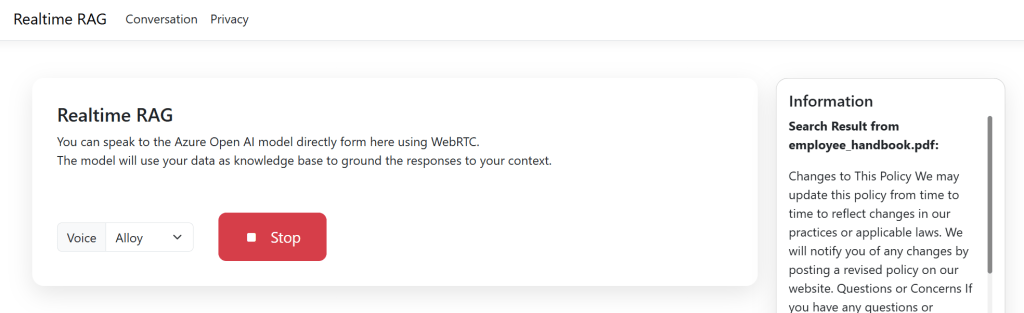
User Interface
<div class="row align-items-center g-3">
    <div class="col-auto">
        <div class="input-group">
            <label class="input-group-text" for="voiceSelect">Voice</label>
            <select id="voiceSelector" class="form-select">
                <option value="alloy">Alloy</option>
                <!-- Additional voice options -->
            </select>
        </div>
    </div>
    <div class="col-auto">
        <button id="btnBeginSession" type="button" class="btn btn-primary">
            <i class="bi bi-mic-fill"></i>
            Start
        </button>
    </div>
</div>
Benefits of Using WebRTC
1. Lower Latency: WebRTC provides peer-to-peer communication, reducing the latency compared to WebSocket implementations.
2. Higher Throughput: The direct connection allows for better audio quality and faster response times.
3. Built-in Audio Handling: WebRTC includes native audio processing capabilities, making it ideal for voice applications.
Conclusion
This proof of concept demonstrates how to create a real-time audio RAG system using Azure OpenAI and WebRTC. The implementation provides a seamless way to interact with enterprise data through natural conversation while maintaining low latency and high quality audio communication.
The combination of WebRTC’s real-time capabilities with Azure OpenAI’s language models and Azure AI Search’s enterprise search capabilities creates a powerful system for enterprise knowledge access and retrieval.
The complete source code for this implementation can be found at: https://github.com/MoimHossain/aoi-real-time-audio-rag

 Reverse Engineering